The Problem
A weekly format, running on rented, fragmented parts.
Weekly free classes and webinars are a core step of the enrolment funnel: a senior tutor teaches the hardest questions from a challenge quiz families complete beforehand, and the session repeats every week. A repeating format changes the economics of every piece of the funnel: anything manual is paid for every single week, and anything fragile breaks on a schedule.
Registration ran through a general-purpose scheduling platform, with a set of Zapier automations bolted on to push confirmation emails and copy details into the CRM. That combination worked, in the sense that messages went out and some records got created, but it was rented rather than owned. The booking form's fields were fixed and could not be reshaped for a low-friction week or a qualification week. The page carried no photo of the tutor, no credentials, no countdown, no urgency copy, nothing to persuade a parent scrolling on a phone. No conversion signal reached the ad platform from any signup, so every dollar of ad spend taught the algorithm nothing. And the Zapier layer matched contacts loosely, so duplicate family records and inconsistent tagging were a standing, quiet cost rather than a one-off bug.
On top of the registration problem, the campaign messaging around each event had its own separate set of issues: manual SMS bursts that ate a block of staff time every campaign week, targeting that went stale within hours of being exported, a join-link reminder with a window measured in minutes and zero margin for error, and no shared record of what had been sent to whom.
Before
- Registration rented from a booking page that could not be optimised or restyled
- No conversion signal reached the ad platform from any signup
- Confirmation emails and CRM entry ran through a bolted-on Zapier layer with loose contact matching and no error visibility
- One campaign channel, SMS, useless for a registrant with no usable mobile
- SMS bursts were a manual export, cross-check and upload pipeline every campaign week
- A personal mailbox with no headroom for a 500-registrant event, and no dedicated event email at all
After
- A hosted, conversion-tuned signup page owned and edited from the dashboard
- Every registration fires a Meta Lead event, compounding ad efficiency weekly
- Every signup matched and written back to the CRM automatically, by email or phone, idempotent
- Two channels, SMS and email, sharing one audience model and dedupe log
- Nudge, reminder and follow-up all run themselves on a schedule, across both channels
- A volume pipe clears 500 registrants in under half an hour, a personal pipe covers small warm sends
The Funnel
Tap to registration to CRM to campaign, no human step.
A parent taps an ad or an SMS, lands on a conversion-tuned signup page, and from that moment everything is automatic, one system, one source of truth, start to finish.
01
Land
02
Register
03
Confirm
04
CRM Sync
05
Nudge & Remind
06
Follow Up
The Solution
One worker, six platforms, one dashboard.
The application is a single JavaScript file deployed to Cloudflare Workers, with a D1 database for state and a five-minute cron trigger for autonomy. It orchestrates six external systems, each doing what it is best at, and deliberately syncs nothing: every action reads live state at the moment it runs, which is what makes targeting self-correcting rather than stale.
The scheduling platform remains available as an alternative registrant source for events still booked externally. The CRM is the source of truth for each family's relationship with the business. SMS delivery, two separate email pipes, and the ad platform's pixel round out the six. The worker itself owns one dataset directly: its own registrants, captured by the hosted signup form, stored in D1 and mirrored into the CRM in the background, so the CRM remains the single source of truth about each family without the worker needing to ask it every time.
The Signup System
Built like a landing page, not a booking form.
The public page is assembled fresh on every request from dashboard-controlled content. The hero pairs the presenter's photo, name and credential badges with two or three benefit points, a live countdown runs to the start time, and urgency and social-proof lines frame the form. The wording adapts itself to the event type, a free class presents a live tutor and a four-step flow, a webinar presents a host and a simpler three-step flow, with no copy editing required.
Which fields the form collects is itself a dashboard decision: email is always taken, and parent name, mobile, child's name, year level and current-student status are each a toggle, enforced identically in the browser and on the server. A presenter library stores each tutor and host with their photo and credentials, so staging next week's event is a matter of picking a name.
Server-rendered, injected configuration
The page's configuration is injected server-side from a single database read, escaped so operator-entered text can never break out of the page. The Zoom link is never sent to the browser at all, it travels only inside the confirmation email, so the link cannot be harvested without registering.
Embeds cleanly in the marketing site
The same page embeds inside the marketing website, resizing itself inside the frame and simulating the sticky form column that frames cannot otherwise provide. On the phones where nearly all traffic arrives, the order is headline, presenter, points, form.
Resilient on submission
The worker saves the registrant, forwards the full payload to the confirmation-email service, and fires the ad platform's Lead event. The registrant is stored whatever happens to the confirmation step, with the delivery outcome recorded per row, so a downstream outage can delay an email but can never lose a family.
CRM Matching and Write-Back
Every signup lands in the CRM, correctly, silently.
Every signup is synchronised into the CRM in the background, after the parent has already seen their confirmation, so the sync adds nothing to perceived speed. The worker searches the sales sheet by email and by normalised mobile, catching the family under whichever identifier is on file. A matched record gains the event tag alongside its existing tags, an appended line in its event log naming the event and date, and a backfilled mobile number if the CRM held none.
An unmatched signup becomes a new record carrying the parent's name, email, mobile in the CRM's canonical format, the child's name, and the year level written to both grade fields in each field's own option format, a detail established by checking the live schema rather than assuming it, which caught a select-option mismatch that would otherwise have silently corrupted the field. Repeat signups are idempotent: tags are not duplicated and the log line is not appended twice, closing the loose-matching, duplicate-record problem the previous automation layer had been quietly causing.
Campaign Flows
Two channels. One audience model. One dedupe log.
The campaign runs three purposes, nudge before the event, reminder at the event, follow-up after it, across two channels that share a single audience model and a single dedupe log. A family can receive one SMS and one email per purpose per campaign, and never two of either, however many times a burst is pressed, scheduled or retried.
Nudge: the completion push, on both channels
Audiences are evaluated live at send time against the CRM's completion markers, so a family who finishes the quiz on Thursday night is out of Friday's send automatically. Each channel has its own copy and its own one-shot Sydney-time schedule, so the email can go out at nine on Saturday morning and the SMS at four in the afternoon, both set the night before.
Reminder: SMS stays instant, email goes paced
The automatic T-15 SMS fires itself when the event starts within the next ten to twenty minutes, with the Zoom link resolved at that moment and a reversible kill switch that blocks it per event without texting anyone. The reminder email, being paced, is designed to be scheduled a few hours ahead instead, and the dashboard says so where the operator is looking.
Follow-up: one email to everyone, attendee or not
A post-event email to every registrant, attendee and no-show alike, since the system deliberately does not guess attendance, carrying whatever next step the week calls for: a results consultation, a guide, the next class. Like the others it has its own copy, schedule, preview and dedupe scope.
Email reaches who SMS cannot. Email audiences are keyed by address, so registrants with no usable mobile are reachable. The channels also help each other: when a form signup arrives without a mobile, the worker recovers the number from the CRM by email across the whole sales sheet, and the dashboard shows each number's provenance.
Two Email Pipes
Chosen per campaign, applied at send time.
Queued email drains through one of two pipes, selected on the dashboard. The pipe applies at send time, so even a burst queued onto the wrong pipe is a ten-second fix, and both pipes share the same queue, dedupe, previews and per-address test mode.
Mailbox pipe
~140/hour
Plaintext sends from the team's own address, under a daily cap sized to leave headroom for ordinary correspondence. It reads like a person wrote it, because operationally one did. Best for small, warm sends where tone matters.
Volume pipe
~1,200/hour
Domain-authenticated transactional sending with no daily cap, clearing a 500-registrant reminder in under half an hour. Built for events that would otherwise exhaust a personal mailbox or take days to reach their own audience.
Operations Dashboard
Organised around how operators actually think.
The dashboard is organised around a simple observation: operators think in purposes, not channels. The page reads as the campaign runs. A nudge card holds the nudge email and the nudge SMS, each with copy, preview, an immediate send and its own schedule. A T-15 reminder card holds the SMS with its auto-toggle and kill switch, and beneath it the reminder email with its schedule. A follow-up card closes the sequence.
Around them sit the event itself, the signup form's content and field toggles, the presenter library, the registrant table with completion badges and phone provenance, the email pipe settings with live queue counts, a test panel for both channels, and the cross-channel sends log that doubles as the audit trail.
Interaction quality was hardened by real use. Every save answers with a visible saving-then-saved confirmation. Dropdowns, toggles and checkboxes save themselves the moment they change. And a guard prevents any save from firing before the page has finished loading its current values.
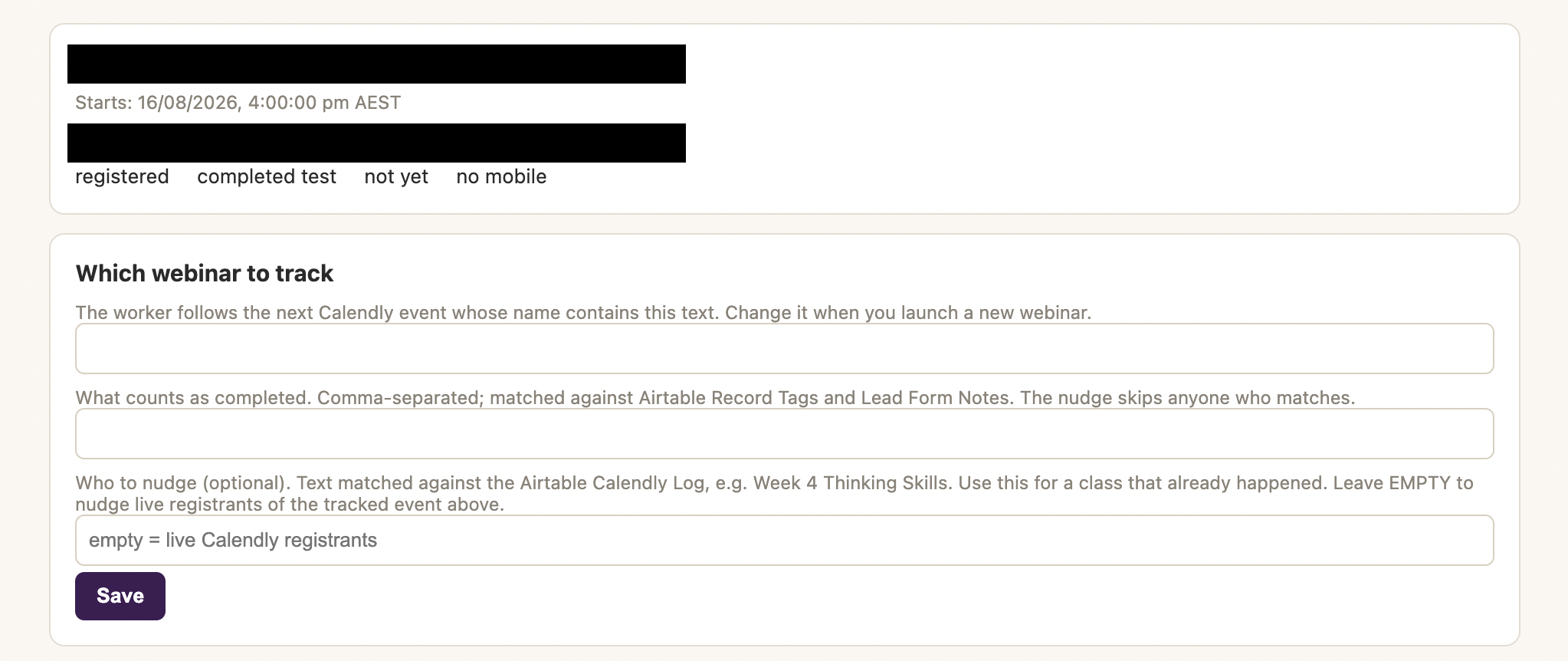
Campaign-defined completion criterion and nudge audience source
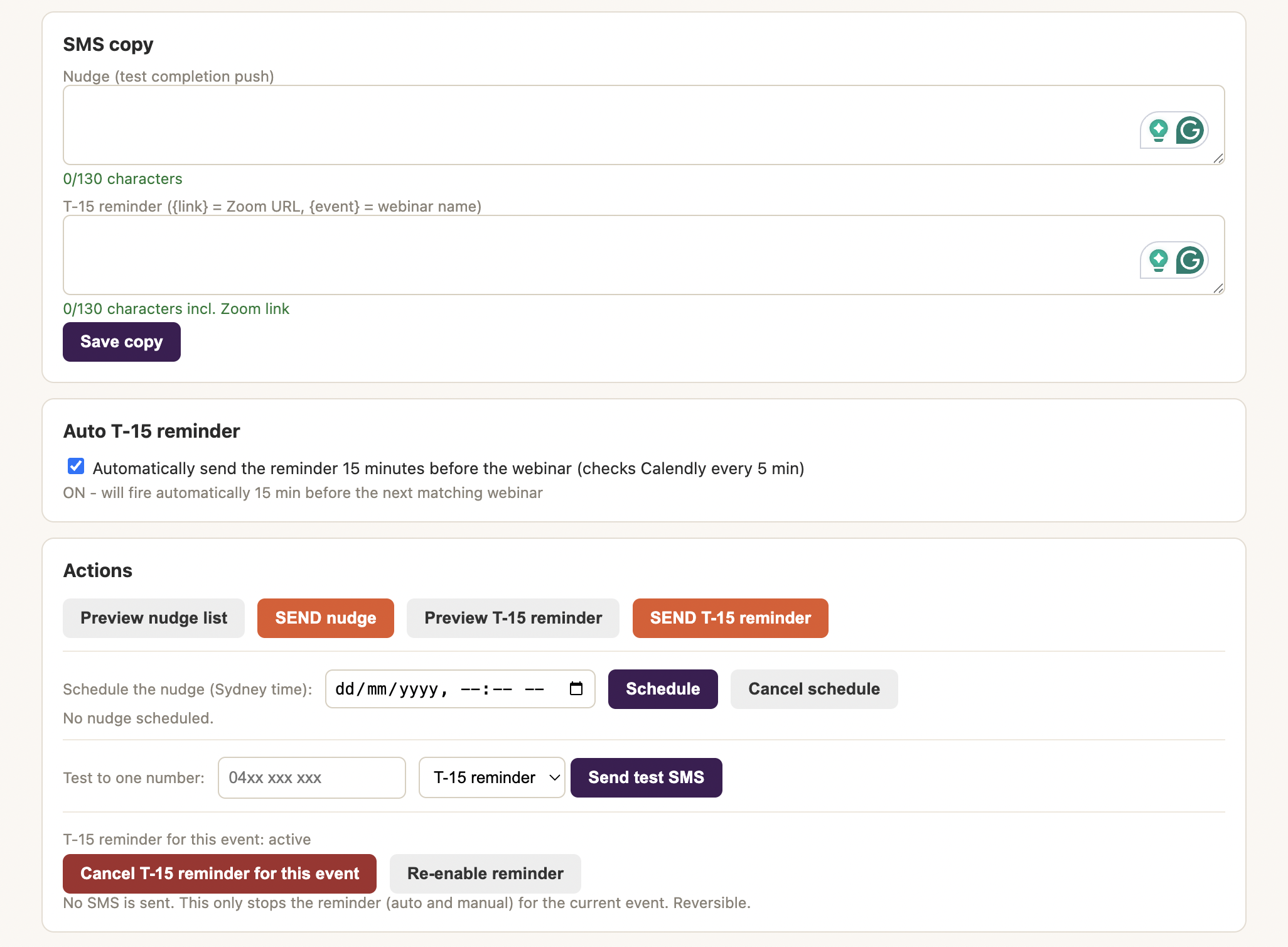
Auto T-15 toggle and the scheduled-nudge picker, set once and fired unattended
Design principle: looking is always free. Every number, every preview, every list can be inspected without risk, because nothing sends without an explicit, confirmed instruction or a schedule the operator explicitly set. That principle spans both channels, both pipes and the signup system alike.
Safety Engineering
The worst cases are boring by design.
Dry-run is the default state of every endpoint. An idempotent send log, keyed by purpose, campaign and recipient, is consulted before the gateway on every real send. A single-segment guard measures the final substituted SMS rather than the template, because a template's length is never the message's length. The worker refuses to send a reminder without a resolvable link rather than texting a placeholder, and a phone normaliser resolves every format parents actually type while rejecting landlines and overseas numbers outright.
Signup validation, twice
The signup API validates against the same field configuration the page renders, so the browser cannot be talked out of a required field. Server-injected page configuration is escaped so operator text can never become script.
Conversion pixel wrapped
The Meta Pixel call is wrapped so that an ad blocker or a network failure can never block a registration. The signup succeeds regardless of whether the pixel fires.
Email queue, doubly idempotent
The email queue is idempotent at queue time and again at send time. Failed sends are recorded per row with the provider's error rather than retried blindly, and the mailbox pipe's daily cap is enforced by the drain, not by memory.
CRM write-back never blocks
Write-back runs after the parent's confirmation and cannot delay it. Its writes were designed against the live schema rather than assumption, catching a select-option mismatch before it could silently corrupt a field.
Load-guarded dashboard saves
A guard prevents any save from firing before the page has finished loading its current values, closing the exact failure mode that once wiped a live event's configuration back to empty.
Tolerant of a vendor's bad error
When the volume pipe's API answered an authorisation formatting problem with an empty server error, the worker was made tolerant of both token formats the vendor's console presents, so the mistake is now impossible to make.
Reusability
Staging a new event is a two-minute task.
Pick the presenter from the library, set the event name, date text, start time and Zoom link, tick the fields to collect, and flip registrations open. The event name scopes the registrant list and every dedupe, so each week is a clean campaign with no bleed from the last, and the page's wording, steps and labels reshape themselves to the event type. The original scheduling-platform mode remains one dropdown away for events still booked externally.
The pattern generalises well beyond webinars. Any workflow shaped like "convert attention into a registration, write it to the CRM, then message exactly the right people at exactly the right minute on whichever channel reaches them" can be assembled from the same parts.
Technical Stack
Six platforms, one worker, one dashboard.
| Component | Technology | Purpose | Cost |
|---|---|---|---|
| Backend, signup page, dashboard | Cloudflare Worker (single JS file, no framework) | All logic: the public signup page, the HTTP API, the dashboard, and every campaign flow | Free |
| State | Cloudflare D1 (SQLite) | Registrants, email queue, idempotent send log, operator settings, presenter library, schedules | Free |
| Scheduling | Cloudflare Cron Trigger (5-minute cadence) | T-15 reminder, one-shot SMS and email schedules, and the paced email queue drain | Free |
| Alternative registrant source | Calendly v2 API | Schedule and Zoom link for events still booked externally | Existing |
| CRM | Airtable REST API (scoped write access) | Completion signals, phone recovery by email, automatic signup write-back | Existing |
| SMS delivery | Cellcast API | Australian mobile delivery for nudge and T-15 reminder | Per send |
| Personal-feel email pipe | Zoho Mail API | Plaintext sends from the team's mailbox at a reputation-safe pace, daily cap | Existing |
| Volume email pipe | ZeptoMail API | Domain-authenticated transactional sending at ~1,200/hour for large events | Per send |
| Ad optimisation | Meta Pixel | PageView on the signup page, Lead conversion fired only on successful registration | Existing |
Result
The front door is owned. The middle is free of hands.
The funnel's front door is now owned. Registration converts on a page built for conversion, presenter authority, countdown, minimal fields, and every registration teaches the ad platform through the Lead event, compounding acquisition efficiency week over week. The middle is now free of hands: CRM entry, confirmation, quiz delivery, reminders and follow-up all happen without a human in the loop, and the sales team opens a CRM that already knows who registered, who completed and who is new.
The reach is now complete: families without a mobile receive the campaign by email, and families without a CRM record are created rather than lost. Scale changed category too, a 500-registrant event was previously either impossible to email or a multi-day drip, the volume pipe now clears it in under half an hour while the mailbox pipe keeps small, warm sends personal.
The weekly cadence that motivated the build is now the system's natural gait: the entire weekend sequence, nudge email in the morning, nudge SMS in the afternoon, reminder email at lunch, T-15 SMS at four-fifteen, follow-up in the evening, is set once on Friday and runs itself.
The lesson underneath the whole build: a system designed around eliminating error classes rather than reducing error rates takes the same time to build and never needs revisiting for the same reason twice. Because targeting, completion, and registration itself are all dashboard-editable concepts rather than buried constants, the entire event funnel now lives in one place, run by whoever is on shift, not by whoever remembers the manual steps.